If you want to become a top striker in Start Your Blue Lock Career, you'll need more than just good decisions. You also need useful weapons, a strong Flow, and enough Skill Points to improve your character. Luckily, you can get extra resources for free by redeeming codes in the game.
In this guide, you'll find the latest Start Your Blue Lock Career codes for October 2026, along with their rewards and instructions on how to redeem them. Use these freebies to improve your player without spending Robux.
All Working Start Your Blue Lock Career Codes
Here are the currently listed active codes for Start Your Blue Lock Career. Redeem them as soon as possible because the developers may remove them without warning.
| Code | Rewards |
|---|---|
WELCOMETOINFINITEMODE | 50 Skill Points for a slot |
EIGHTTHOUSANDLIKES | 5 Lucky Weapon Rolls and 5 Lucky Flow Rolls |
SEVENTHOUSANDLIKES | 5 Lucky Weapon Rolls and 5 Lucky Flow Rolls |
INFINITEUPDATE | 10 Weapon Rolls and 10 Flow Rolls |
ONEMILLIONVISITS | 25 Weapon Rolls, 25 Flow Rolls, 5 Lucky Weapon Rolls, 5 Lucky Flow Rolls, and 350 Ego Coins |
LATENIGHTBUGFIXES | 3 Lucky Flow Spins, 3 Lucky Rolls, 7 Flow Spins, and 7 Weapon Spins |
QOLU20 | 8 Flow Spins and 8 Weapon Spins |
ENDOFBUGS | 5 Lucky Rolls and 5 Lucky Spins |
BUGFIXING2U20 | 5 Lucky Flow Spins and 3 Lucky Rolls |
BUGFIXINGU20 | 15 Weapon Rolls, 3 Lucky Rolls, 5 Lucky Flow Rolls, 350 Ego Coins, and 40 Skill Points for a slot |
U20DELAYLOL | 3 Lucky Rolls, 3 Lucky Flow Rolls, 250 Ego Coins, and 20 Skill Points for a slot |
GOODLUCKU20PLAYERS | 30 Skill Points for a slot |
U20UPDATE | 15 Weapon Rolls, 15 Flow Rolls, 8 Lucky Rolls, 8 Lucky Flow Rolls, and 400 Ego Coins |
SERVERBOOSTS | 15 Weapon Rolls, 3 Lucky Weapon Rolls, and 300 Ego Coins |
Note: Code availability can change. These codes are based on the latest available published list, and individual codes may stop working before this article is updated.
Expired Start Your Blue Lock Career Codes
The following codes have been reported as expired in the latest available code list:
VERYANNOYINGBUGFIXESSECONDWEAPONBUGTHANKYOUMESSIHAPPYOCTOBERONETHOUSANDCCUTHANKYOUSOMUCHSIXHUNDREDCCUFIVEHUNDREDCCUTHANKYOUSOMUCHEVERYONEFOURHUNDREDCCUTHREEHUNDREDCCU
If a code from this section works for you, it may have been reactivated by the developers. Otherwise, skip it and try one of the active codes above.
How to Redeem Start Your Blue Lock Career Codes
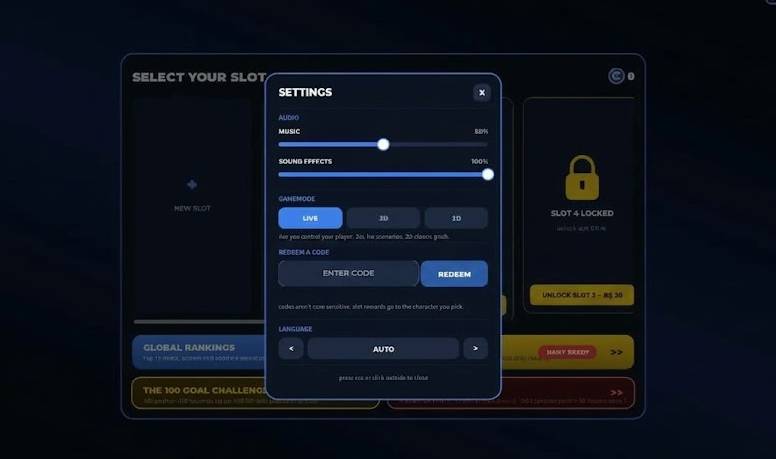
Redeeming codes is simple once you know where to find the option. Follow these steps to collect your rewards.
- Open Roblox and launch Start Your Blue Lock Career.
- Complete the introductory tutorial if required.
- Look for the Settings icon near the bottom-left corner of the screen.
- Open Settings and find the code redemption box.
- Enter or paste a working code into the box.
- Click the Redeem button to claim your rewards.
Repeat the process for each code you want to use.
Tip: Copy and paste codes directly from the list above. Some codes contain long strings of letters, so typing them manually can lead to mistakes.
When Start Your Blue Lock Career Codes don't Work?
If a code doesn't work, don't worry. There are a few common reasons why this happens.
The code has expired: Developers often release codes for updates, milestones, and bug fixes. Some are available for only a limited time.
You entered the code incorrectly: Check for missing letters, extra spaces, or spelling mistakes. It's best to copy the complete code exactly as shown.
You've already redeemed it: Most codes can only be claimed once per account. Entering the same code again usually won't grant additional rewards.
The game needs an update: If a newly released code fails, try leaving the current server and joining another one. You can also restart Roblox and check again.
If none of these steps works, the code may no longer be available.
How to Find More Start Your Blue Lock Career Codes
Want to get more free rewards in the future? Keep an eye on the game's official community channels.
- Official Discord: Check the game's Discord server for announcements, new codes, and update information.
- Ponder Inc Roblox group: Follow the developers' Roblox group to keep up with game updates and milestone rewards.
- Game updates: Look out for new releases, bug fixes, and player milestones, as these can bring additional codes.
You can also bookmark this page and check back whenever the game receives a major update. New codes can appear without much notice, and older ones may expire.